Dynamic Binning In Power BI
Background and Motivation
Disclaimer: The case described in this blog article is fictious and simplification of the real case.
I needed to visualize customer grouping based on their number of transactions in Power BI. If a customer buys once or twice, then this customer is "One-Time Buyer" or "Repeat Buyer", respectively. If a customer buys 3 times or more, then this customer is "Loyal Customer". My first thought was, okay, this is an usual grouping a.k.a binning.
The analysis should answer business question, out of customers registered in our system, how many are "One-Time Buyer", "Repeat Buyer" or "Loyal Customer"? I tried to apply a normal grouping (static grouping). I calculated distinct count of a customer activity within the dataset, then assign them the associated groups using conditional logic.I dragged the neccesary filters that user needs into the visualization. Seemed perfect, right? I wish, but no 😃
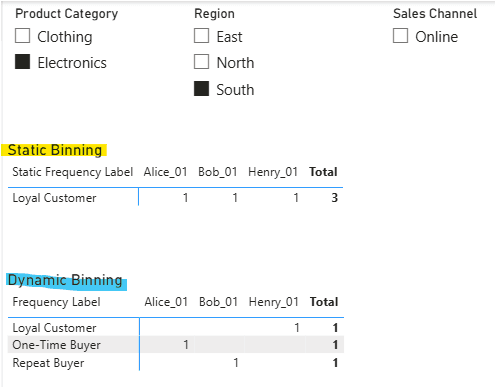
As soon as I applied the filters, the goruping did not change. Why was that? Because the grouping was static, it is based on calculated columns. Whereas what we need is dynamic binning. Dynamic binning allows us to create bins (groups/ranges) that automatically adjust based on slicer selections or other filters in our report. The key is using measures instead of calculated columns. When a user selects a slicer, the bins automatically recalculate based on the filtered data.
Data
Fictious data used in this case.
| Order ID | Customer Name | Order Date | Product Category | Region | Sales Channel | Amount |
|---|---|---|---|---|---|---|
| 1001 | Alice | 15/01/2024 | Electronics | North | Online | 500 |
| 1002 | Alice | 20/02/2024 | Electronics | North | Online | 600 |
| 1003 | Alice | 10/03/2024 | Clothing | North | Store | 150 |
| 1004 | Alice | 05/04/2024 | Electronics | South | Online | 700 |
| 1005 | Bob | 20/01/2024 | Electronics | South | Online | 800 |
| 1006 | Bob | 15/02/2024 | Electronics | South | Online | 450 |
| 1007 | Bob | 25/03/2024 | Home | East | Store | 300 |
| 1008 | Charlie | 10/01/2024 | Clothing | North | Store | 200 |
| 1009 | Charlie | 28/02/2024 | Clothing | North | Online | 250 |
| 1010 | David | 05/01/2024 | Home | West | Online | 400 |
| 1011 | Emma | 12/02/2024 | Electronics | East | Store | 550 |
| 1012 | Emma | 18/03/2024 | Home | East | Online | 350 |
| 1013 | Emma | 22/04/2024 | Electronics | North | Online | 600 |
| 1014 | Frank | 08/01/2024 | Clothing | South | Store | 180 |
| 1015 | Grace | 14/02/2024 | Home | West | Online | 420 |
| 1016 | Grace | 20/03/2024 | Home | West | Store | 380 |
| 1017 | Grace | 10/04/2024 | Electronics | North | Online | 700 |
| 1018 | Henry | 25/01/2024 | Electronics | South | Online | 650 |
| 1019 | Henry | 18/02/2024 | Electronics | South | Online | 720 |
| 1020 | Henry | 12/03/2024 | Electronics | South | Online | 680 |
| 1021 | Henry | 08/04/2024 | Clothing | South | Store | 190 |
| 1022 | Ivy | 30/01/2024 | Home | East | Online | 310 |
Static Binning
Static binning is created using calculated column, which calculates once at data refresh.
Column - Static Frequency Label =
VAR _orderCount =
  CALCULATE(
      DISTINCTCOUNT(Fact_Sales[Order ID]),
      ALLEXCEPT(Fact_Sales, Fact_Sales[Customer ID])
  )
RETURN
  IF(_orderCount >= 3, "Loyal Customer",
  IF(_orderCount = 2, "Repeat Buyer",
  "One-Time Buyer"))
The DAX above counts total orders per customer and stores result in each row. It never changes regardless of filters.
Dynamic Binning
-
Create disconnected frequency groups table
- Home -> Enter Data
- Create table named
Dim_Customer_Group
Sort Frequency Label 1 One-Time Buyer 2 Repeat Buyer 3 Loyal Customer
Customer Count - Dynamic Binning =

  VAR _selectedBin = SELECTEDVALUE('Dim_Customer_Group'[Sort])

  VAR _customersInSelectedBin =
      FILTER(
          VALUES(Fact_Sales[Customer ID]), //This creates a list of unique customers ID in current filter context. This is our reference for our calculation
          VAR _currentCustomer = Fact_Sales[Customer ID] //Capture current customer ID from row context, before CALCULATE destroys row context

          VAR _orderCount = //Count this customer's orders within the filtered context
              CALCULATE(
                  DISTINCTCOUNT(Fact_Sales[Order ID]),
                  ALLEXCEPT( //ALLEXCEPT keeps Category/Region/Channel filters active, but removes all other filters (including Customer ID)
                      Fact_Sales,
                      Fact_Sales[Product Category],
                      Fact_Sales[Region],
                      Fact_Sales[Sales Channel]
                  ),
                  Fact_Sales[Customer ID] = _currentCustomer //Then, re-add customer filter (example: _currentCustomer = "Alice_01")
              )

          VAR _customerFrequencyGroup =  IF(_orderCount >= 3, 3, _orderCount) //Assigning customer to frequency group (1, 2, or 3+)

          RETURN _customerFrequencyGroup = _selectedBin
      )

      RETURN
          COUNTROWS(_customersInSelectedBin) //Return total customers in this bin
The DAX above only considers filters on Product category, Region and Sales Channel. It ignores all other filters/slicers. Depending on the business question, this inclusion/exclusion of the dimension might be revelant.
In case we would like to consider ALL filter, we can just simplify the DAX as follows.
Customer Count - Dynamic Binning =
      VAR _selectedBin =
          SELECTEDVALUE('Dim_Customer_Group'[Sort])

      RETURN
      CALCULATE(
          DISTINCTCOUNT(Fact_Sales[Customer ID]),
          FILTER(
              VALUES(Fact_Sales[Customer ID]),
              VAR _orderCount =
                  CALCULATE(
                      DISTINCTCOUNT(Fact_Sales[Order ID])
                  )
              VAR _StaticFrequencyGroup =
                  IF(_orderCount >= 3, 3, _orderCount)
              RETURN
                  _StaticFrequencyGroup = _selectedBin
          )
      )
Comparison
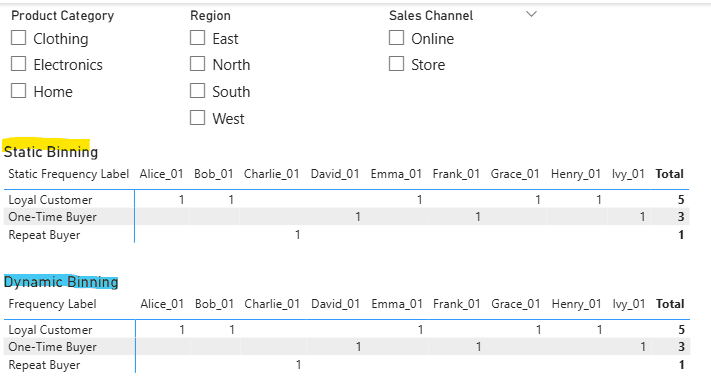
If there is no filter applied, both show the same results.
Once filters are applied, static binning is not recalculated.